macOS Secure Input: find what is blocking your shortcuts
macOS Secure Input can stop shortcuts and text expanders across apps. Find the app holding it, disable Secure Input on your Mac, then check that it cleared.

Your text expander stops in every app. A dictation shortcut does nothing. A keyboard utility that worked a minute ago has gone quiet. One possible cause is macOS Secure Input: while it's active, other apps that watch keyboard events are kept from seeing them (Apple, 2007).
To find and disable Secure Input on a Mac, read the kCGSSessionSecureInputPID value with ioreg, check that PID with ps, and follow the action for the process you find. Close a password prompt or quit its app; for Terminal, turn off Terminal → Secure Keyboard Entry. If the process is loginwindow, treat it as a clue rather than proof and try locking and unlocking, then sign out if it persists. Recheck the state before testing your shortcuts again.
I build TypeTab, a Mac autocomplete app that can be blocked by Secure Input too. I checked the commands against my own Mac on macOS 26.7.2 on November 8, 2026, and the recovery steps against Apple and vendor documentation.
What is macOS Secure Input?
macOS Secure Input is a system state that protects sensitive typing by keeping keyboard interceptors from receiving key events. A focused password field commonly enables it; an app can also turn it on deliberately while collecting sensitive information. If it stays active after you leave that field, keyboard shortcuts and text expansion can fail across apps.
Users have also reported dictation hotkeys failing at the same time; one report lists Fn-Fn, Alfred snippets, and Keyboard Maestro triggers, though that's an observed setup rather than a guarantee about every dictation path (Apple, 2007; TextExpander, 2026; TidBITS Talk, 2026).
Secure Input isn't Terminal's Secure Keyboard Entry menu item. That's one app's switch for protecting what you type in Terminal; it can affect other keyboard tools while it's enabled (Apple Support, checked November 2026).
How do I find the app holding Secure Input?
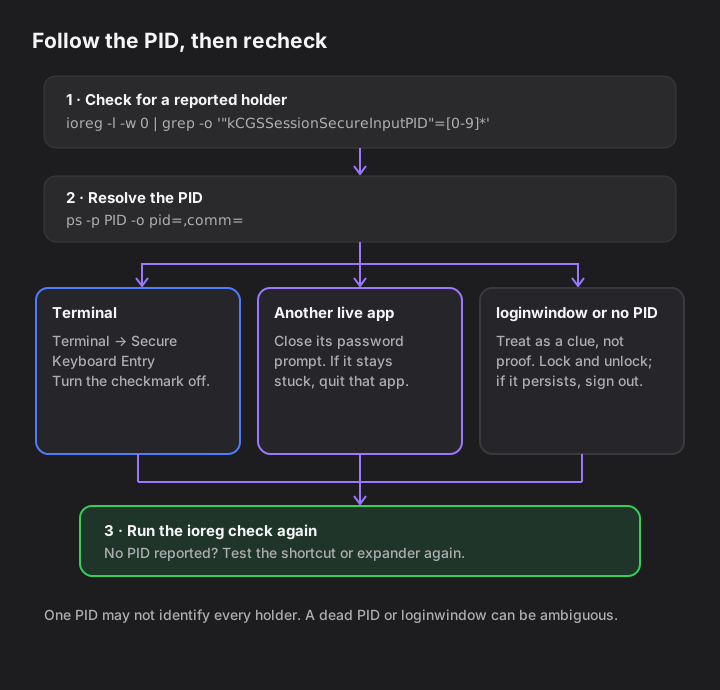
Run the ioreg check, then use its PID as a lead for ps. I ran these exact commands on my Mac on November 8, 2026, with macOS 26.7.2 (build 25G325):
ioreg -l -w 0 | grep -o '"kCGSSessionSecureInputPID"=[0-9]*' | sort -u
On my Mac, the output was "kCGSSessionSecureInputPID"=405. If the command prints no line, it didn't report a Secure Input PID at that moment.
Use the number you see in place of 405:
ps -p 405 -o pid=,comm=
On my Mac, this printed 405 /System/Library/CoreServices/loginwindow.app/Contents/MacOS/loginwindow.
The PID is useful evidence, not a complete list of every possible holder. A Bitwarden issue reports that ioreg may show only one process even when more than one holds Secure Input, and that loginwindow can appear while Bitwarden is the app keeping the state active (Bitwarden, 2026). If the PID is missing from ps, or resolves to loginwindow, don't assume the name proves which app caused the problem.
How do I disable Secure Input on Mac?
Use the process name to choose the smallest recovery step, then rerun the ioreg command. Secure Input should protect a sensitive field, so finish or dismiss the prompt; if it stays stuck, quit that app. TextExpander's support guide names password managers, browser sign-in tabs, and Terminal as common cases (TextExpander, 2026).
What ps shows |
Why it may be active | What to try |
|---|---|---|
| Terminal | Terminal's separate Secure Keyboard Entry switch is on. | In Terminal, choose Terminal → Secure Keyboard Entry to turn off the checkmark after sensitive entry; turn it back on before entering sensitive text in Terminal again. (Apple Support, checked November 2026) |
| Password manager | A master-password prompt or focused locked-vault field may still be active. | Finish or dismiss the prompt; if it remains stuck, quit and reopen that app. (TextExpander, 2026) |
| Browser or another app | A sign-in page or verification-code field may still be waiting for input. | Find the open prompt, complete or close it, then recheck. (TextExpander, 2026) |
loginwindow or a dead PID |
The reported name may not identify the app that enabled the state. | Lock and unlock once. If it remains, save your work and sign out of macOS, then sign in again. (Keyboard Maestro forum, 2023; TextExpander, 2026; TidBITS Talk, 2026; Claude Code issue #81585, 2026) |
Sources: Apple Support (2026); TextExpander (2026); Keyboard Maestro forum (2023).
A running app isn't automatically at fault just because it uses Secure Input during password entry. If its menu-bar status or the ioreg result clears, test the shortcut that stopped working.
Does loginwindow mean macOS has a Secure Input bug?
No single loginwindow result proves that. Keyboard Maestro maintainer Peter Lewis says the label can mean there's "no obvious process" holding Secure Input, while a Bitwarden report describes a case where the command displayed loginwindow although Bitwarden was the holder (Keyboard Maestro forum, 2023; Bitwarden, 2026).
I saw loginwindow as PID 405 on my own Mac on November 8. A separate Claude Code report described a similar PID result, but the reporter later withdrew it and said Claude Desktop was misattributed. That thread is a user report, not an Apple-confirmed bug (Claude Code issue #81585, 2026).
For a loginwindow result, try locking the Mac and unlocking with your password, then rerun the check. TextExpander recommends that step, but my own run didn't test whether it clears the state. If it remains active, save your work and sign out and back in; TextExpander says that clears many loginwindow cases (TextExpander, 2026).
Is Secure Input showing up more often?
The author's GitHub exact-phrase search found more matching issues in 2026 than in 2025, but it cannot tell whether Secure Input incidents became more common. It counted public GitHub issues and pull requests, not affected Macs; 2026 covers January 1 through November 8 only.
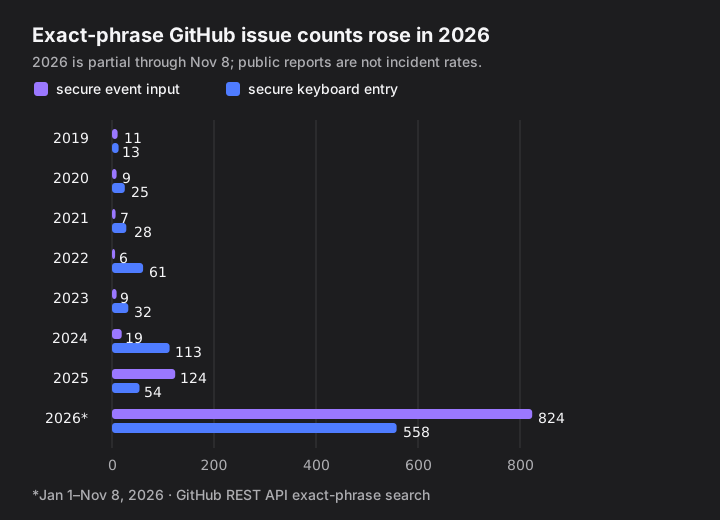
The two searches returned 124 versus 824 issues for "secure event input" and 54 versus 558 for "secure keyboard entry" in 2025 versus partial 2026. These aren't unique bug reports or a rate per user. Some of the opened 2026 discussions involve terminal tools such as Ghostty and Warp, but that small, self-selected sample can't explain the increase (Ghostty, 2026; Warp, 2026).
Where TypeTab fits
TypeTab is one of the keyboard tools that pauses when Secure Input stops its keys from arriving. Since version 1.2.0, its menu reports that Secure Input is on and, when it can tell, names the app holding it — but only after keys actually stop arriving. A Secure Input status alone doesn't mean TypeTab is blocked (TypeTab 1.2.0 notes).
I build TypeTab, so this is the product's own behavior: it doesn't override Secure Input or read password fields. If autocomplete is the tool that stopped, where system-wide autocomplete works and where it stops explains where it can work; the text expander and AI autocomplete comparison covers a separate option for reusable snippets.
TypeTab is Mac-only, needs macOS 14 or later on Apple Silicon, and has a free trial of 100 word completions and 20 full-line completions (TypeTab pricing).
The useful fix is the one that releases the active holder; keep Secure Input available for the next password field.
FAQ
Can I turn Secure Input off everywhere in macOS?
There is no global off switch in the sources checked here. Secure Input is a protective system state that apps enable for sensitive entry; close the prompt or turn off the specific app setting instead (Apple, 2007; Apple Support, checked November 2026).
Does Terminal's Secure Keyboard Entry turn off Secure Input for the whole Mac?
No. It is Terminal's own menu switch, but while enabled it can stop other keyboard tools from observing keys. Choose Terminal → Secure Keyboard Entry to turn off its checkmark when you no longer need that protection (Apple Support, checked November 2026).
Why did my text expander stop in every app?
Secure Input can block keyboard event tools system-wide while a password field or another sensitive prompt holds it. Check the reported PID, look for an open password or verification prompt, and recheck after closing it (Apple, 2007; TextExpander, 2026).
Will locking and unlocking always clear loginwindow?
No. TextExpander recommends trying it, but Warp #16337 says quitting Warp cleared it; the TidBITS report says logging out cleared it; Claude Code #81585 says only a restart cleared it. These are individual reports, not a general rule (TextExpander, 2026).
What if ioreg prints no PID?
It means the command did not find the kCGSSessionSecureInputPID property at that moment. Try the shortcut or text expander again; if it still fails, investigate its own permissions or app-specific behavior rather than assuming Secure Input is active.