How TypeTab learns your writing style — entirely on your Mac
The story of how we built a writing model that quietly learns your style on-device, becomes a file you own and can move between Macs, and never sends a word you type to anyone.

Here's the short version, because it's the part I'm proudest of: TypeTab ships already knowing how to write, then quietly becomes a model of you — and that personal model is a small file that lives in your user folder, that you can back up, move to a new Mac, and keep forever. The longer you use it, the more it sounds like you. And not one word you type ever leaves your machine to make that happen.
I want to tell you how we built that, and why we made some choices that were, frankly, the harder way to do it. Not a spec sheet — the story.
We started with Gemma 3, then taught it to write like a person
Every good assistant needs a foundation. Ours is Gemma 3, Google's open small language model. We didn't build a language model from scratch — almost nobody should — but we did something more interesting: we took that strong, compact base and custom-tuned it for one job only, finishing everyday sentences the way real people write them.
That tuning mix was deliberate. Most models are trained to sound like the internet: confident, generic, a little robotic. We trained ours on the kind of writing you actually do all day — emails, messages, posts, notes, long-form prose, even the prompts people type into AI tools. So instead of producing essay-shaped filler, it produces the next few words of your sentence. That's a very different skill, and tuning for it specifically is what makes the suggestions feel like they belong.
Then came the choice that shaped everything else. We could have run this in the cloud on a giant model. Instead we shrank our tuned model down, quantized it, and made it run entirely on your Mac using Apple's MLX framework — the on-device machine-learning engine built for Apple Silicon.
Why take the harder path? Two reasons, and I'll be honest about both:
- Trust. A writing assistant is only useful if you let it into everything — the sensitive work email, the message to your partner, the post you're second-guessing. You can't do that with a tool that ships your keystrokes to a server. So the model had to come to your words, not the other way around.
- Quality of feel. On-device means no round-trip to a data center. The suggestion is there a beat before you'd have typed it. That tiny bit of instant-ness is the whole difference between "magic" and "annoying."
A 1-billion-parameter model on your laptop won't write your novel. But for finishing the sentence you're already writing, it's not just enough — it's better, because it's right there and it's yours.
Then it starts learning you
The shipped model is a great generalist. The interesting part is what happens next.
As you use TypeTab, it builds a personal layer on top of the base model — and trains it on your Mac. In plain terms: it learns your vocabulary, the names of your clients and colleagues, your turns of phrase, the exact warmth of your sign-offs. After a few days, the suggestions stop sounding like "good writing" and start sounding like your writing.
The mechanism, since you asked for some of the tech: it's a LoRA adapter. Think of LoRA as a small, lightweight "diff" that nudges the big model toward you without retraining the whole thing. It's only a few megabytes. The base stays the base; your adapter rides on top. That's why personalization can happen on a laptop at all — we're not retraining a giant model, we're learning a tiny, efficient layer of just the part that's you.
Where does the learning material come from? Two honest sources:
- What you accept. Every time you take a suggestion, that's a tiny signal: "yes, that's how I'd have put it."
- What you actually write. The lines you commit to and send are the ground truth of your voice.
The training runs quietly in the background, and only when your Mac is plugged into power — so it never touches your battery and never gets in your way. Each run produces a new version of your adapter (v1, v2, v3…), and TypeTab atomically switches to the newest one. So it's literal: the more you use it, the more it learns. Your model in month three is sharper than your model in week one, with no effort from you.
Bring your own writing — tune it before you even start
You don't have to wait days for it to learn you. If you've got a back catalogue — old blog posts, your best emails, a doc of your brand's voice guidelines, a folder of past captions — you can hand it straight over.
Open Settings → Training Data. There's an Add Training Text box right in the middle: paste your writing into it and click Add Pasted Text, or click Import Text File… to pull in a whole document at once. TypeTab cleans and chunks it, then folds it into your on-device corpus — the same pile of examples your personal model learns from. (The summary up top shows exactly how much you've gathered so far.)
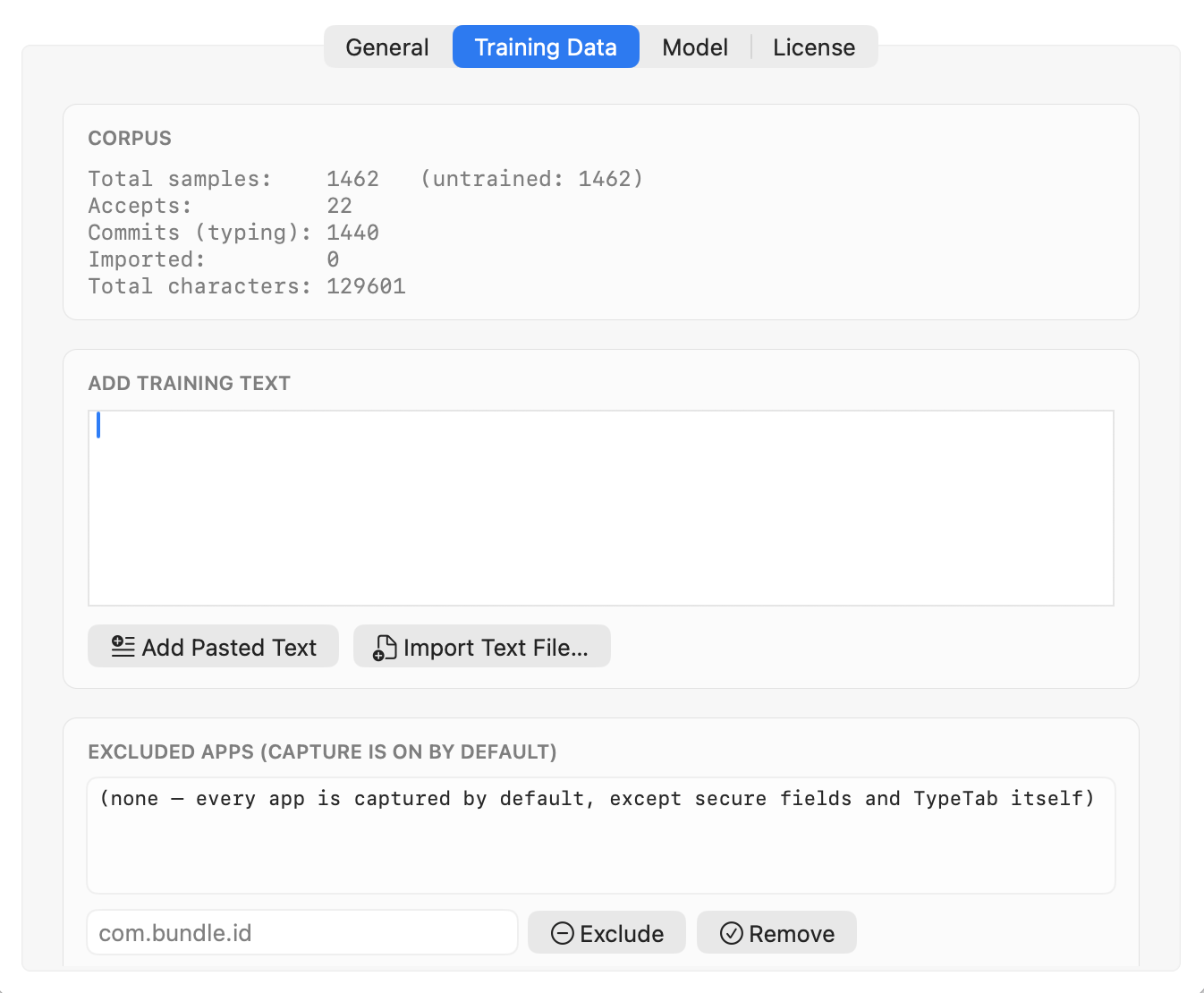
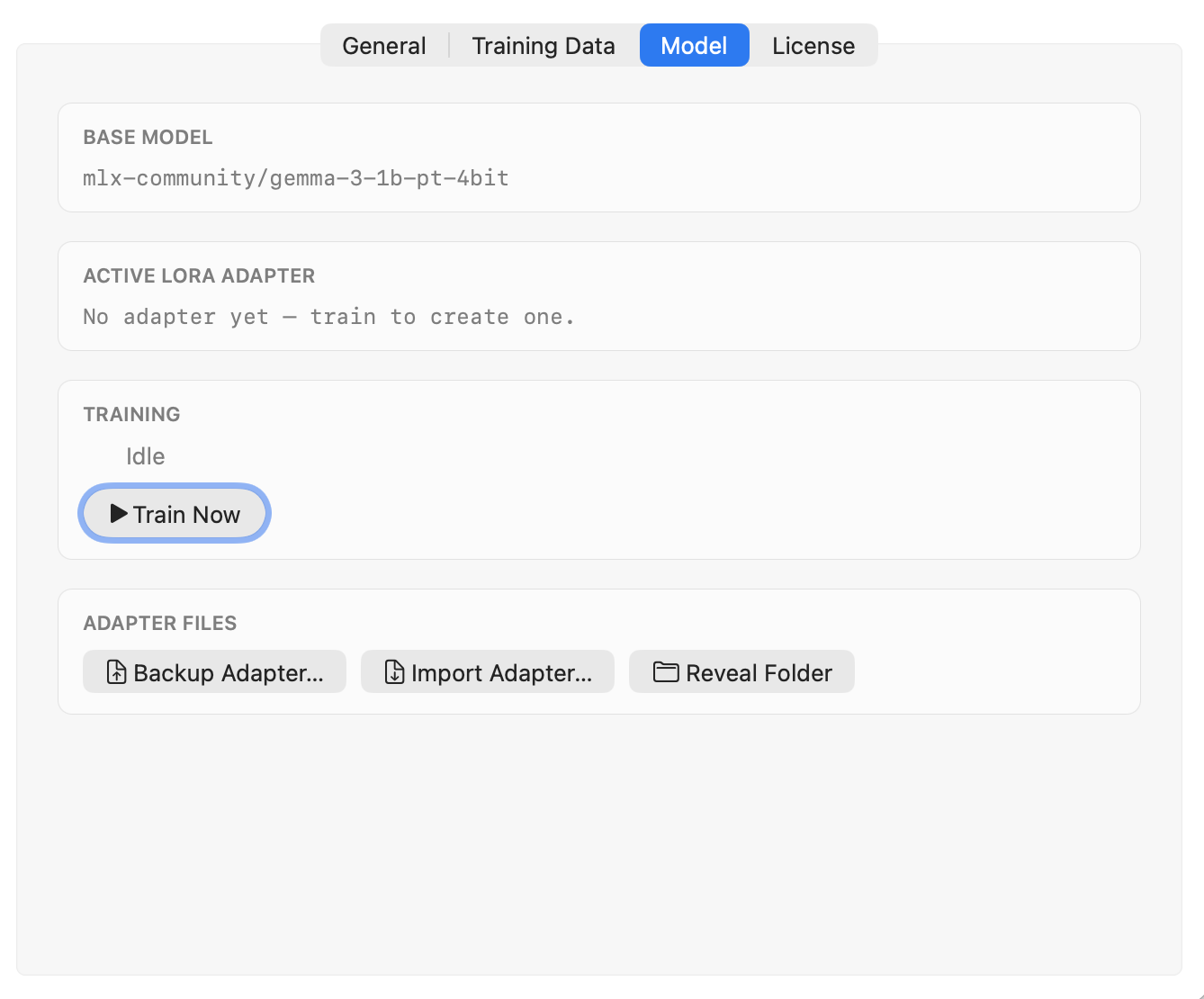
Normally TypeTab trains on its own in the background. But if you've just dropped in a batch of text and want the model to learn it now, you don't have to wait for the next scheduled run. Switch to the Model tab and press Train Now.
So on day one you can seed the model with a year of your own voice and skip the warm-up entirely — writers do this with their published work; social teams do it with their approved-copy archive. It's the difference between an assistant that has to get to know you slowly and one you can simply introduce yourself to.
Your trained model is a file you own
This is the part people don't expect, and it's the part I think matters most for trusting a tool long-term.
Your personalization isn't locked inside an account on our servers, because there is no such account and there are no such servers. It's a folder in your own user library. Which means you can export it. On the Model tab pictured above, the Adapter Files row has Backup Adapter… and Import Adapter…. Get a new Mac, reinstall after a wipe, or just want a safety copy before a big OS update — back up your active adapter to a file, then Import Adapter… on the other machine and you're instantly back to the model that already knows you. No re-learning from zero.
You can also export your entire training dataset as a JSONL file — every sample, in the open. It's yours; you should be able to read it, keep it, or delete it.
I love this property because of what it implies: your writing style, the thing that took you years to develop, becomes a small portable artifact that you hold the only copy of. Switch devices all you like. Your voice comes with you.
None of it leaves your Mac
Let me be precise here, because "private" gets thrown around loosely.
Every prediction and every training run happens on your device. Your keystrokes are never uploaded. There is no telemetry — TypeTab doesn't phone home with what you type, what apps you use, or how you write. There's no analytics SDK quietly watching in the background. We didn't add one. The only time the app talks to our servers at all is a one-time license check, which sends your license key — never your text.
On top of that, the app is careful about what it even looks at:
- Password fields are never read. macOS marks secure text fields, and TypeTab refuses them outright.
- Sensitive apps are excluded — password managers, system settings, and TypeTab itself, always.
- Secrets are scrubbed before anything is stored. Card numbers, API tokens, and verification codes get redacted out so they never even reach the on-device corpus it learns from.
It works on a plane with the Wi-Fi off. That's not a marketing line; it's a consequence of the architecture. If the model is on your Mac and the learning is on your Mac and nothing is uploaded, then "offline" is just the normal state.
Why we did it the hard way
I'll close with the honest tradeoff, because the easy version of this product exists and we chose not to build it.
The easy version runs a big model in the cloud, logs everything to improve "the product," and learns one average style for everyone. It's cheaper to build and it ships faster. We said no to all three: on-device is harder to engineer, per-user learning on a laptop is fiddly, and refusing to collect data means we're flying without the usual dashboards.
We did it anyway because the whole promise only works if it's true. An assistant you can trust with everything has to actually be trustworthy with everything. A model that sounds like you has to actually learn from you, specifically. And a tool you'll rely on for years should leave you holding your own model — not renting it back from us.
That's the bet. A smaller model, run locally, tuned to one person — yours — and kept entirely in your hands. We think quality and privacy aren't a tradeoff here. Done right, they're the same decision.
Questions people ask
Does TypeTab send what I type to the cloud? No. Predictions and learning all run on your Mac, and there's no telemetry. The only network call is a one-time license check that sends your key, never your text.
What model does it use? A custom-tuned version of Gemma 3, shrunk and quantized to run on Apple Silicon via Apple's MLX. On top of that sits a personal LoRA adapter that learns your style locally.
How does it learn my writing style? From the suggestions you accept and the text you actually write — plus any documents you choose to import. It trains a small personal adapter in the background, only when plugged in, and gets better the more you use it.
Can I move my trained model to a new Mac? Yes. Export (back up) your adapter from Settings, then import it on the other Mac. You can also export your whole dataset as JSONL. Your model is a file you own.
Can I train it on my own writing before using it? Yes — paste text or import a file in Settings and it'll tune your personal model on your existing work right away.
The takeaway
TypeTab is a strong general writing model that becomes your writing model — learning quietly on your Mac, improving the more you use it, accepting your own back catalogue as a head start, and handing you a portable file you can carry to any machine. All of it on-device, none of it uploaded.
If you want the bigger picture of the everyday experience, start with Introducing TypeTab, or read how this approach helps you write faster without sounding like AI. The full privacy detail lives on our privacy page.
Try TypeTab free — your first 100 word completions and 20 full lines are on us, no account. Then watch it become you.